




There are a number of sports in the world. And only a few of them hold your attention like football. Now the football fans will definitely remember the El Clásico in 2017, when the game was levelled until the 90th minute. Now, imagine if your user sends a request and they get a timeout error. They lose a lot. Your users lose the opportunity to celebrate Barcelona’s winning goal. They lose out on the moment to witness Messi, while bleeding, scored his 500th goal and drove Barça to a victory. And you? You lose users.
Football API timeout errors cause more damage in live games, because of high user expectations. It’s a simple rule — whoever delivers the fastest and most accurate data without interruptions wins this race.
These errors spike out during peak hours, just when your users need you the most.
In this guide, we break down exactly what football API timeout errors are, what triggers them, how to diagnose them, and — most importantly — how to fix them before they cost you users.
Get Started with Our Football Data Feed
Football APIWhat Are Football API Timeout Errors?
Here’s the simplest way to think about it. Your app sends a request to a football data API. The server doesn’t respond fast enough. The connection gets cut. That’s a timeout error. It doesn’t matter whether you’re pulling soccer data for a stats dashboard or powering a live scoreboard — the failure looks the same to your user: nothing.
There are two ways this breaks down:
- Connect timeout — Your app can’t even shake hands with the server. The connection never establishes.
- Read/response timeout — You connected fine, but the data never comes back. The server went quiet mid-conversation.
When football API timeout errors hit, you’ll usually see one of these HTTP status codes:
- 408 Request Timeout — Your client was too slow. The server got tired of waiting for you.
- 504 Gateway Timeout — The API’s gateway couldn’t get a response from its own backend in time.
- 502 Bad Gateway — Often timeout-adjacent. The upstream server returned an invalid response.
- 503 Service Unavailable — The server is overwhelmed or temporarily down.
Here’s the thing most developers get wrong: not all timeouts are the server’s fault. Your own client configuration can cause them just as easily. More on that in a minute.
Here’s an in-depth guide to common football API errors.
What Causes Football API Timeout Errors?
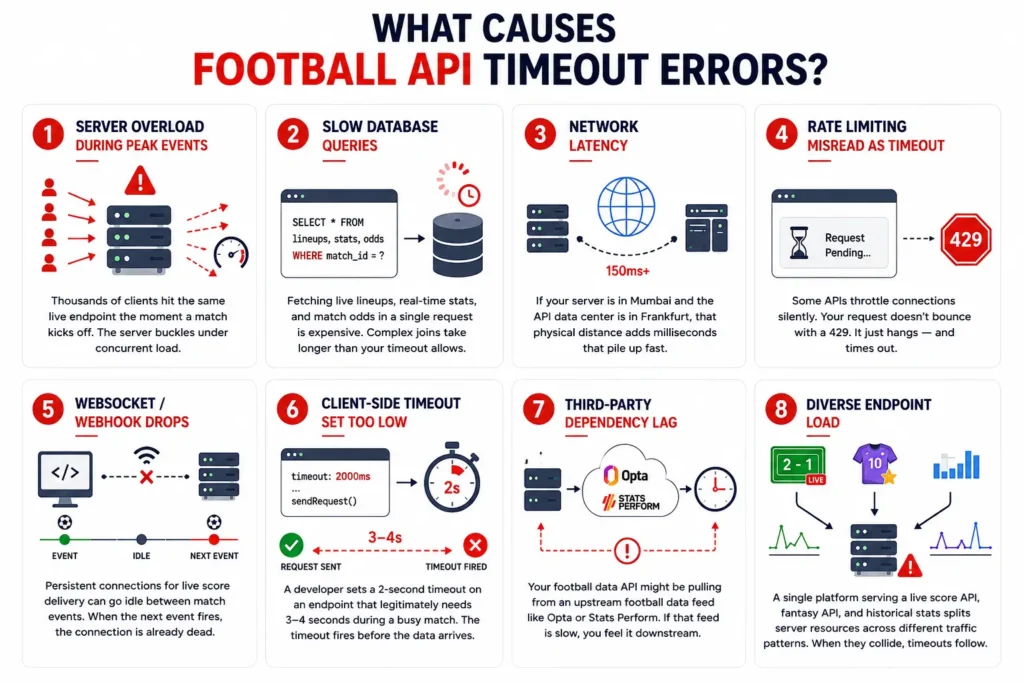
Football data isn’t like a product catalogue. It changes every few seconds during a live match. That makes it uniquely vulnerable to timeouts. Here’s what triggers them:
- Server overload during peak events — Thousands of clients all hit the same live endpoint the moment a match kicks off. The server buckles under concurrent load.
- Slow database queries — Fetching live lineups, real-time stats, and match odds in a single request is expensive. Complex joins take longer than your timeout allows.
- Network latency — If your server is in Mumbai and the API data center is in Frankfurt, that physical distance adds milliseconds that pile up fast.
- Rate limiting misread as timeout — Some APIs throttle connections silently. Your request doesn’t bounce with a 429. It just hangs — and times out.
- WebSocket/webhook drops — Persistent connections for live score delivery can go idle between match events. When the next event fires, the connection is already dead.
- Client-side timeout set too low — A developer sets a 2-second timeout on an endpoint that legitimately needs 3-4 seconds during a busy match. The timeout fires before the data ever arrives.
- Third-party dependency lag — Your football data API might be pulling from an upstream football data feed like Opta or Stats Perform. If that feed is slow, you feel it downstream.
- Diverse endpoint load — A single platform serving a football live score API, a football fantasy API, and historical stats all at once splits server resources across very different traffic patterns. Live scores spike. Fantasy calls cluster around kickoff. When they collide, timeouts follow.
Any one of these can kill a live match experience. Often, it’s two or three happening at once.
How Do You Diagnose a Football API Timeout Error?
Don’t guess. Run the diagnosis in order and you’ll find the culprit fast.
- Check the HTTP status code first. 408 means your client is the problem. 504 means the API server or its proxy is the problem. They require different fixes.
- Log the exact request URL and endpoint. Live score endpoints and static fixtures endpoints behave very differently under load. Know which one is failing.
- Check whether the timeout is consistent or intermittent. Consistent timeouts point to a configuration issue. Intermittent ones point to traffic spikes or load problems.
- Test the same endpoint during off-peak hours. If the timeout disappears at 3am but reliably hits during match windows, it’s a load issue — not a code issue.
- Use diagnostic tools. Run curl –max-time [seconds] [endpoint] from a neutral machine. Test with Postman’s timeout settings. Check the browser DevTools Network tab for timing breakdowns.
- Check your football API provider’s status page. A good football API provider will publish an uptime dashboard. If they’re having an incident, you’ll see it there before you waste hours debugging your own code.
Here’s the cheat sheet for the two most common football API timeout errors:
| Code | Name | Likely Cause | Who Fixes It |
| 408 | Request Timeout | Client too slow sending request | Your app |
| 504 | Gateway Timeout | API server/proxy overloaded | API provider |
Learn Everything About Our Competition Coverage
Football API CoverageFootball API Timeout Errors on Live Match Endpoints
Live endpoints are where football API timeout errors hurt the most — and where they’re most likely to occur.
Here’s why live data is uniquely vulnerable:
- High polling frequency — Most live score integrations poll every 5-15 seconds. That’s up to 12 requests per minute, per user. Multiply that across your user base during a Champions League final.
- Payload spikes — When a goal, substitution, and yellow card happen in the same minute, the response payload for that moment is significantly larger than a quiet spell. Your timeout threshold doesn’t adjust for this.
- Concurrent load — Every client watching the same match hits the same endpoint at roughly the same time. The server sees a wall of simultaneous requests.
The endpoints that timeout most frequently: live scores, live lineups, live match events, and live commentary feeds. If you’re running a football live score API on top of HTTP polling, you’re stacking every one of these risks.
The smartest fix for live data isn’t tuning your HTTP polling. It’s switching to WebSocket. A persistent connection stays open for the duration of the match — the server pushes updates from the football data feed to you as they happen. No repeated handshakes. No repeated timeout exposure.
Entity Sport’s live football data API supports WebSocket streams for real-time delivery, designed specifically for the traffic patterns that live match data creates.
How to Fix Football API Timeout Errors in Your Application

Some of these fixes are in your code. Some require pressure on your API provider. Know the difference.
- Increase your client timeout threshold. If you’re polling a live match endpoint, don’t set your timeout below 5-10 seconds. During busy match moments, legitimate response times can spike past 3-4 seconds.
- Implement exponential backoff retry logic. Don’t hammer a timed-out endpoint with immediate retries. Wait 1 second, then 2, then 4. You’ll stop making the server’s problem worse — and give it room to recover.
- Cache recent responses. If a live score hasn’t changed in 10 seconds, serve the cached version while your retry runs. Your users see data. Your server gets breathing room.
- Use async, non-blocking requests. A single timeout on one endpoint shouldn’t freeze your whole app. Make your API calls asynchronous so one slow request doesn’t block everything else.
- Switch to WebSocket for live data. Eliminates the repeated connect overhead of HTTP polling entirely. One connection, pushed updates, far fewer timeout scenarios.
- Implement a circuit breaker pattern. After a set number of consecutive timeouts, stop sending requests for a defined window. Alert your team. Don’t let a struggling server get hammered into a full outage.
Client-side fixes handle what’s in your control. But if the root cause is an underpowered API provider, no amount of retry logic will save you during El Clásico.
How to Prevent Football API Timeout Errors Before They Happen
The best time to fix football API timeout errors is before your users ever see one.
- Choose a football data API with SLA uptime guarantees. Look for 99.9% or better. If a provider can’t put that in writing, take it as a signal.
- Pick API endpoints geographically close to your users. CDN-backed APIs reduce the latency that makes timeout thresholds feel shorter than they are.
- Monitor response times proactively. Set alerts at 80% of your timeout threshold — not 100%. By the time you hit 100%, your users are already seeing errors.
- Stress-test your integration before major events. Simulate high-load scenarios before the Champions League final or a World Cup knockout round. Don’t discover your breaking point live.
- Subscribe to your API provider’s incident alerts. A status page you never check is useless. Get alerts pushed to your team the moment something goes wrong.
- Use a dedicated football data API. General-purpose REST APIs retrofitted for sports data aren’t built for the traffic patterns that live football creates. Whether you’re serving soccer data to a stats platform or live scores to a betting dashboard, purpose-built providers handle the spikes.
Prevention isn’t glamorous. But it’s the difference between a live match that runs flawlessly and one that goes dark at the 90th minute.
Are Football API Timeout Errors the API Provider’s Fault?
Honest answer: sometimes. Not always.
Here’s how to split the blame:
- Client-side causes (your responsibility): Timeout threshold set too low. Synchronous blocking I/O. No retry logic. Not caching responses.
- Server-side causes (provider’s responsibility): Infrastructure that doesn’t scale for peak events. Upstream feed lag from data suppliers. Poor load balancing. Slow database queries under concurrent load.
How to tell who’s actually at fault: reproduce the timeout using curl from a neutral machine — not your app, not your server. If it times out there too, the problem is on the provider’s end. If it only fails in your app, the problem is in your code.
A quality football API provider will auto-scale for major match windows, communicate incidents in real time, and publish a transparent status page. If yours doesn’t do any of those things, that’s worth knowing. It also means your football API provider’s infrastructure ceiling is your product’s ceiling.
Choosing a Football API That Minimizes Timeout Risks
Not all football data APIs are built the same. When timeout resilience matters, here’s what to look for:
- WebSocket support for live data — Persistent connections eliminate the repeated overhead of HTTP polling and dramatically reduce timeout exposure during live matches.
- CDN-distributed infrastructure — Your users shouldn’t be making requests to a single server on the other side of the world. A CDN puts data delivery closer to where your users are.
- Published uptime and SLA data — If a provider won’t commit to uptime numbers publicly, assume they have something to hide.
- Clear rate limit Football API documentation — Silent throttling looks like a timeout. Know your limits before you hit them.
- Responsive support during live events — Timeout issues don’t wait for business hours. Your API provider’s support shouldn’t either. This matters most if you’re running a football fantasy API — your users are making lineup decisions in real time.
Entity Sport’s Football API is built for exactly these conditions — live match data delivery via WebSocket streams, global coverage across 80+ leagues, and infrastructure designed to handle the traffic spikes that come with live football. A free Developer plan is available with no credit card required.
Here’s a guide to choosing the best football API provider.
Get in Touch with Us
ConnectConclusion
Football API timeout errors are common. They’re fixable. And with the right setup, they’re largely preventable.
The responsibility sits on two sides: your client configuration and your API provider’s infrastructure. Own your side of it — raise your timeout thresholds, add retry logic, move live data to WebSocket. Then make sure the provider you’re building on can hold their end of the deal when 50,000 users are watching the same match.
The best football apps don’t just survive big moments. They’re built for them.
- Raise client timeout thresholds to at least 5-10 seconds for live endpoints.
- Add exponential backoff retry logic to handle transient failures gracefully.
- Move live match data to WebSocket streams to eliminate polling overhead.
Ready to build on infrastructure that handles the load? Try Entity Sport’s Football API — WebSocket-native, 100+ leagues covered, free Developer plan available with no credit card required.
Frequently Asked Questions
Q1: What is the most common HTTP status code for a football API timeout error?
A: The two you’ll see most are 408 (Request Timeout, usually client-side) and 504 (Gateway Timeout, usually server or proxy-side). A 408 means your client was too slow getting the request out. A 504 means the upstream server didn’t respond in time. They look similar from the outside but point to completely different problems.
Q2: How long should my timeout be set for live football API requests?
A: At minimum, 5-10 seconds for live endpoints. Static endpoints like fixtures and standings can work with shorter thresholds, but a football live score API has to handle payload spikes during busy moments — a goal followed by a substitution followed by a VAR check all arriving in the same response window. Give those requests room.
Q3: Why do football API timeout errors happen more during big matches?
A: Because every client watching the same match hits the same live endpoint at the same time. A Champions League final might send thousands of simultaneous requests the moment the final whistle blows. That concurrent load slows database queries, saturates network connections, and pushes response times past timeout thresholds that worked fine during a Tuesday evening League One fixture.
Q4: Will switching to WebSocket stop football API timeout errors?
A: For live data, it significantly reduces them. HTTP polling opens and closes a connection with every request — each one a new opportunity for a timeout. WebSocket keeps a single persistent connection open for the life of the match, with the server pushing updates as they happen. Fewer handshakes means fewer points of failure.
Q5: Can I retry a football API request that timed out?
A: Yes — but not immediately. Retrying right away just adds to the server load that probably caused the timeout in the first place. Use exponential backoff: wait 1 second, then 2, then 4. Also check whether your endpoint is idempotent before retrying a POST request. A GET for live scores is safe to retry. A POST that triggers a transaction is not.


